Another customer came to us because of WhatsApp risk control issues. Risk control issues arise every day. Friends who have related needs should come and check us out. Understanding and effectively responding to risk control and building a multi-dimensional protection system from account risk reduction, unblocking and data retrieval are the keys to ensuring stable business development.
1. Account risk reduction strategy: multi-pronged approach to reduce risks
(1) Account warming: laying the foundation for account security
Account warming is an important preliminary work for account risk reduction. In the first two weeks of the official launch of the marketing campaign, a series of operations need to be carried out around account configuration and activity.
- Basic information settingsAfter the new account goes online, set up the name, avatar, nickname and other information completely at once. Avoid using marketing words when setting up. It is recommended to use your real name or a standardized brand name for the name. Choose a high-definition and compliant picture for the avatar. After the setting is completed, avoid changing it at will to reduce the risk of being judged as an abnormal account by the system. If there is residual information from your predecessor after the number is logged into the device, do not reply to avoid involving account suspension.
- Keep account activeGo online and offline regularly every day, interact and communicate with 3-4 friends saved in the mobile address book, and send more than 20 plain text messages with an interval of more than 5 minutes to avoid sending them in seconds. At the same time, make voice or video calls for more than 5 minutes with 1-2 friends every day to enhance account activity and authenticity. In addition, publish one update every day, such as sharing industry information, daily scenery, etc., like and comment on friends' updates, and do 3-5 updates every day. Establishing groups, sending links, advertising, etc. are strictly prohibited in the first 10 days of a new account.
(2) Decentralized marketing behavior: reduce single account risk
- Account matrix marketingAbandon the model where a single account takes on all marketing tasks, build an account matrix, and allocate marketing work to multiple accounts. The marketing actions of each account are averaged to prevent a single account from triggering risk control due to excessive marketing actions. For example, cross-border e-commerce companies can set up multiple accounts to be responsible for promoting different product lines and communicating with customers in different regions, so that each account can carry out marketing within a reasonable range and extend the service life of the account.
- Fenliubao live code and multi-account access tool assistanceUse WhatsApp live code tool (Diversion Bao) to seamlessly divert customers to multiple different accounts or groups. You can also generate links to add friends, reducing the pressure on a single account and the risk of traffic concentration. Combined with the multi-account access tool (SalesEpoch), you can securely log in to multiple accounts on a single device (mobile phone or computer), and achieve network isolation to eliminate risks caused by account association due to devices.
For example, a global expansion educational institution uses Diliubao to evenly distribute consulting course customers to different customer service accounts, improving service efficiency and reducing the risk of account suspension; with SalesEpochmulti-account access, customer service staff can conveniently manage multiple accounts on one computer, making their work more efficient.
2. Unblocking method: Respond proactively and strive for account recovery
(1) Self-examination of reasons for account suspension
Before trying to unblock the account, you need to roughly determine the reason why the account was blocked. Common reasons for account suspension include violating terms of service (such as sending illegal content, impersonating identities, harassing others), using inferior third-party applications (bypassing security mechanisms and posing data privacy risks), engaging in spam and bulk messaging (sending the same or similar content to a large number of users in a short period of time, privately recruiting people into groups, etc.), being reported and blocked by a large number of users, suspicious activities (such as batch forwarding, sending suspicious links, logging in with unfamiliar devices), and high-frequency marketing of newly registered accounts without account warming, etc. Clarifying the reasons will help you make a targeted appeal.
(2) Unblocking operation methods
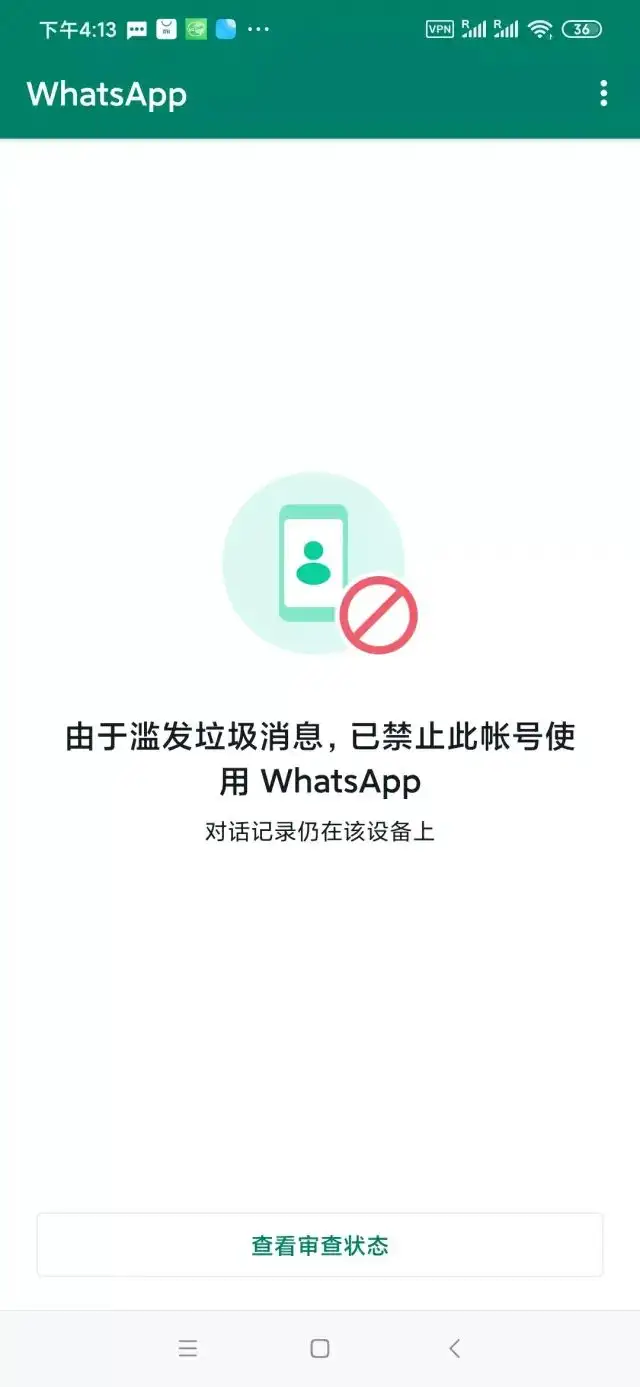
- Directly apply for customer service assistance via mobile phoneDownload the WhatsApp application, enter the blocked mobile phone number, click "Next" and then select "Support", fill in the review application, explain in detail the situation of the account being blocked, and attach relevant screenshots as supporting information as much as possible, submit the application and wait for review. This method is simple and direct to operate, and is suitable for account suspension appeals caused by system misjudgments and other situations.
2. Write an email complaint to the official
Send an email to the official email (support@support.whatsapp.com). The email content must include detailed account information, such as registered mobile phone number, approximate time range of account use, etc. Sincerely explain the reason for the ban, emphasize the importance of the account to your business, and promise to strictly follow the official rules in the future and not violate the rules again. Please ask customer service to help restore the account functions. Be careful to avoid using QQ mailboxes. You can choose international mailboxes such as Gmail to improve the success rate of mail reception and processing.
3. Account suspension data retrieval: data backup to ensure business continuity
Once a WhatsApp account is banned, customer data and chat history will be lost if not backed up, causing huge losses to the business. SocialEpoch WhatsApp SCRM SalesEpoch product provides a strong guarantee in this regard, and it has the function of automatically backing up customer data and chat information.
Whether it is due to account ban or customer handover issues caused by employee resignation, enterprises can use SocialEpoch WhatsApp SCRM SalesEpoch to inherit customer data and chat information to the next account in a timely and complete manner. For example, after an employee of a cross-border e-commerce company resigned, the new customer service staff used SalesEpoch to quickly obtain the employee's previous communication records with customers, seamlessly connect services, and avoid customer loss due to personnel changes; if the account is unfortunately blocked, the company can also rely on SalesEpoch's backup data to quickly switch accounts to continue to keep in touch with customers, minimizing the risk of business interruption, and ensuring the security of customer assets and business continuity.